Introduction
Interactive mode means that the user can instruct your machine. For example, I can execute a list of instructions, one instruction at a time, or even set a breakpoint where your machine stops at a certain instruction memory address.
You will be required to handle optional switches as a command line argument. If the user specifies -i (dash I), then you must read the binary file given, but do not start executing. Instead, you will present a prompt so the user can instruct your machine.
Required Commands
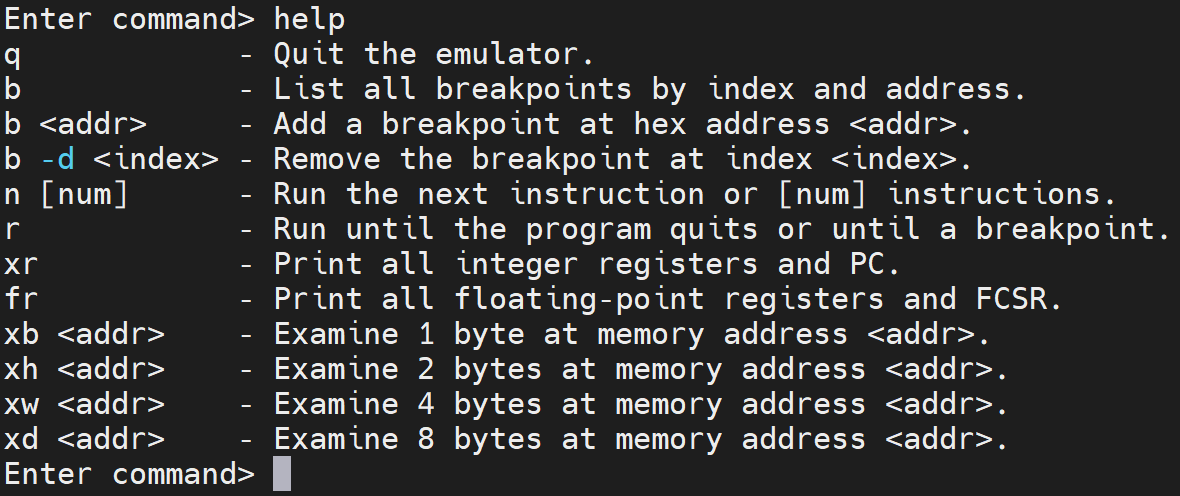
You must handle and support the following commands for interactive mode.
Registers
The xr and fr commands will examine the x registers and f registers, respectively. If you have two banks of registers for 32-bit and 64-bit precision, you will need to have: fsr and fdr for floating-point single precision register and floating-point double precision register. If you are using a single bank, then fr will suffice.
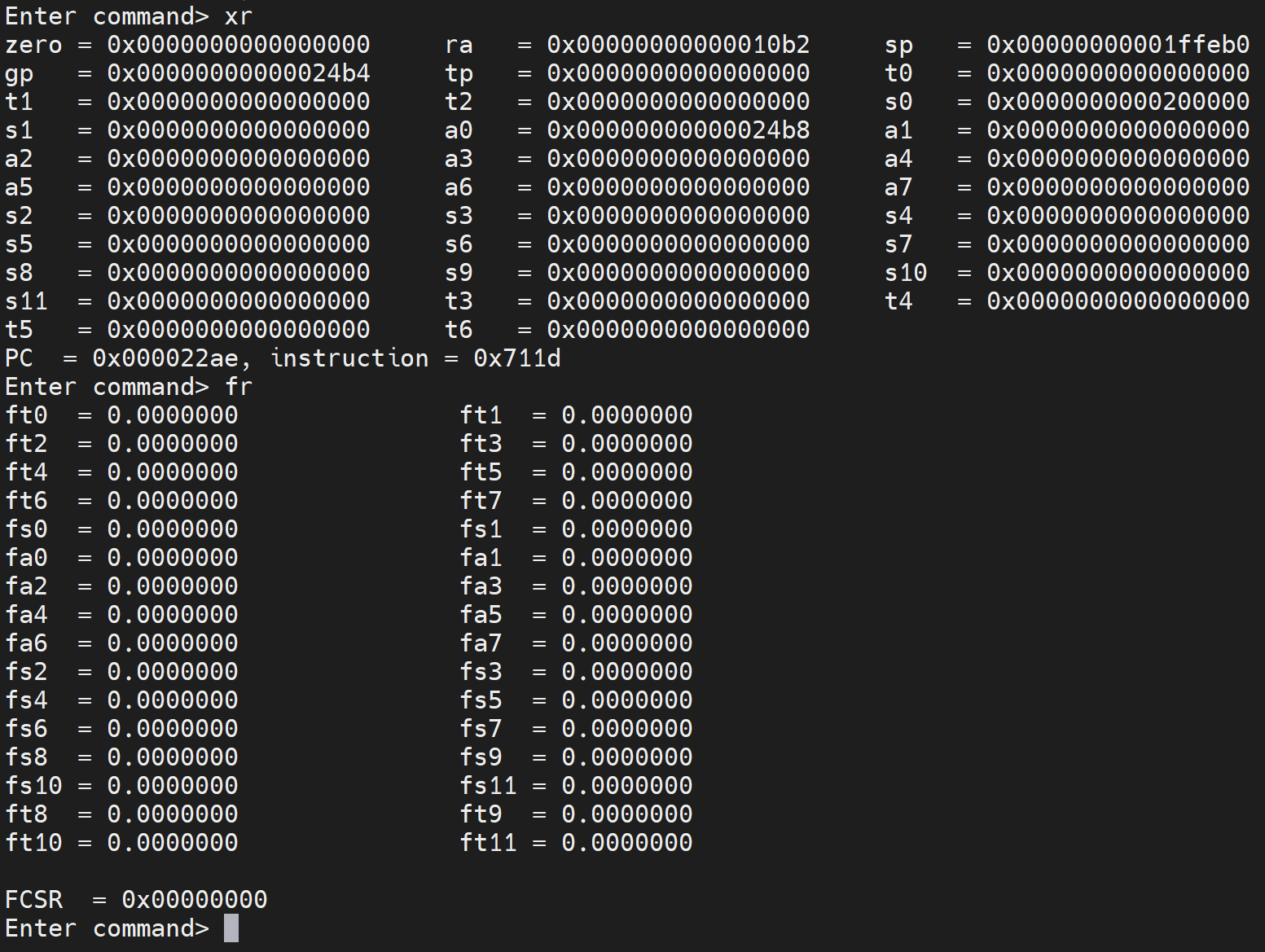
The x registers will be printed out using their ABI names followed by an equals sign followed by the value in hex padded to 16-places. Three registers will be printed per line. Finally, the program counter (PC) will be printed out followed by the instruction the PC points to.
The fr (or fsr and fdr) will print out all of the floating-point registers using their ABI names followed by an equals sign followed by the value precise to 8 digits. If you implement the FCSR, the fr command will also print it. Otherwise, omit it.
Breakpoints
A breakpoint is a memory address that will automatically cause your emulator to stop and return back to the prompt. Usually, you can use a breakpoint to debug a certain instruction by first adding the breakpoint and then running the program.
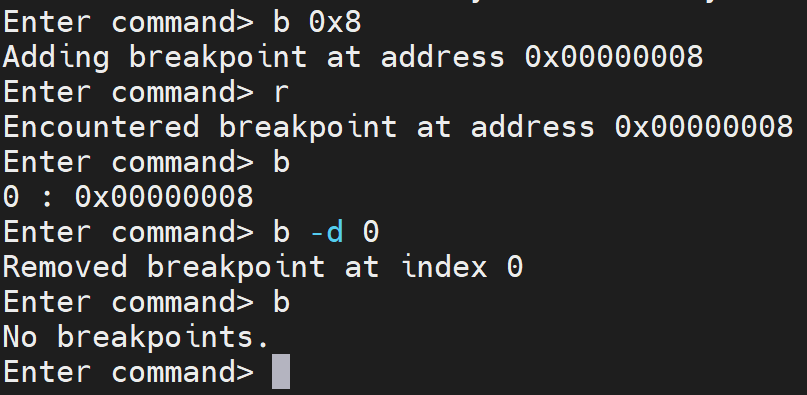
The b command controls breakpoints. If the user types ‘b’ all alone, then you will list all breakpoints. If no breakpoints exist, output “No breakpoints.”. Otherwise, if the user specifies a hex address, then your program will set a breakpoint at the given address. If the user specifies -d, then the third parameter is an index to the breakpoint the user wants to delete. Make sure the user cannot specify two or more breakpoints to the same address.
Running Instruction
The ‘r’ command will run the instructions at the current PC until it either crashes, a breakpoint is reached, or the exit system call is made.
If the user specifies ‘n’, then one instruction will execute, and your program will go back to the prompt. Otherwise, if the user specifies an optional [num], your program will run the next [num] instructions, and then it will go back to the prompt.

Examining Memory
The xb, xh, xw, and xd commands will allow the user to examine a byte, half-word (2 bytes), word (4 bytes), and a doubleword (8 bytes), respectively. You will print the address, the value in hex and then the value in decimal.
The user will specify the address to examine as the parameter to the command.
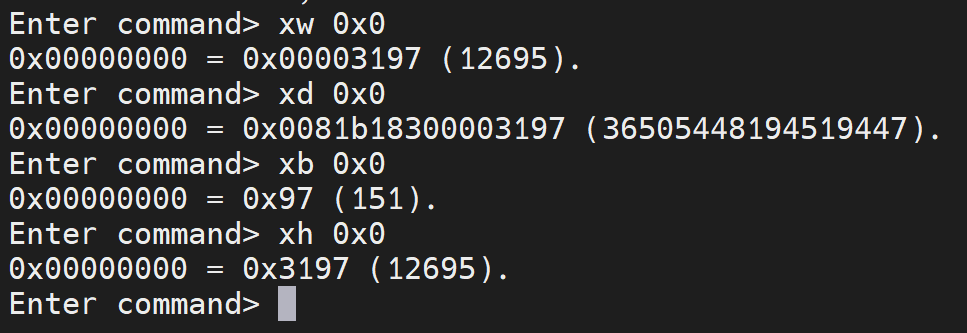
Always pad out the hex value to the length. For example, a word should be 8 hex digits, a doubleword should be 16, and a short should be four.
EBREAK Instruction
You must support the EBREAK instruction. This instruction is an explicit breakpoint instruction. It looks much like the ECALL instruction except one bit is flipped to 1. When the ebreak instruction is reached, your program must return back to the prompt.

Quitting
Under no circumstances should your machine crash or quit without the user specifying ‘q’ to quit. When the exit system call is reached, print out the the exit system call was reached, but go back to the prompt so the user can examine memory as well as the registers. Only when the user types ‘q’ for quit should your machine quit.
Help
You should always support ‘h’ and ‘?’ and display help. The help should give the commands, parameters, and a short one sentence description of what the command does.
Extending
You may support any additional commands that you want. As long as the base set of commands are present and working, you will receive credit for interactive mode. Any additional commands must be in the help and a short description should follow.