Learning Objectives
- Understand what recursion is and what it means.
- Understand which scenarios would warrant using recursion.
- Understand how code placed before the recursive call is executed and in what order.
- Understand how code placed after the recursive call is executed and in what order.
- Understand the limitations of recursion.
- Understand why we should avoid recursion if possible.
Video
Introduction
Recursion simply means a function calls itself. While by itself this doesn’t really mean much to you, but when you think about it, a function has an entry point and an exit point. Recursion allows us to go down a data structure while having our way back up.
The following code is a recursive call…notice that the function definition calls itself.
def recur(i):
   if i <= 0:
      return 1
   else:
      return i + recur(i-1)

print(recur(4))
The code above prints “11”, so let’s see how.
The first function call is recur(4), and it behaves normally and enters the function recur with i = 4.
# First call with recur(4) i = 4
if 4 <= 0: return 1  # This is not true, so we skip to the else statement
else: return 4 + recur(3)

# Second call with recur(3) i = 3
if 3 <= 0: return 1   # This is not true, so we skip to the else statement
else: return 3 + recur(2)

# Third call with recur(2) i = 2
if 2 <= 0: return 1   # This is not true, so we skip to the else statement
else: return 2 + recur(1)

# Fourth call with recur(1) i = 1
if 1 <= 0: return 1   # This is not true, so we skip to the else statement
else: return 1 + recur(0)

# Fifth call with recur(0) i = 0
if 0 <= 0: return 1   # This is true, so we return 1

# Return back to fourth call with recur(1) i = 1
return 1 + 1 # recur(0) became 1

# Return back to third call with recur(2) i = 2
return 2 + 2 # recur(1) was 1 + 1 = 2

# Return back to second call with recur(3) i = 3
return 3 + 4 # recur(2) was 2 + 2 = 4

# Return back to first call with recur(4) i = 4
return 4 + 7 # recur(3) was 3 + 4 = 7

# Return back to main with result = 11
# print(recur(4)) turns into print(11)
print(recur(4))
So, recursion is almost like a loop. Our condition is the base case, which is when the recursive function should end. In the case above, our base case is if i <= 0. We can tell that this is a base case because (1) it is possible to get to this case, and (2) this case doesn’t contain a recursive call.
Why Recursion?
This really doesn’t do us any good, yet, because we can just use a while or a for loop to accomplish the same thing. However, we can use recursion if we need the result of the furthest calculation before we can calculate the first answer. Functions calls save the return link so that it can get back to who called it. We can use this to our advantage. We can see with the code below that we can use recursion to execute code backwards. For example,
def func(x):
    if ord(x) <= ord('z'):
        print(x, end='')
        func(chr(ord(x) + 1))


func('a')
The code above will print abcdefghijklmnopqrstuvwxyz. Notice that our base case is when x is greater than ord(‘z’), which gives the numeric representation of the character z. In the case above, we use the if statement to execute the recursive call. So, if ord(x) > ord(‘z’), then the block is skipped and the function returns–which stops the recursion.
Statements Before the Recursive Call
Notice that the print is before the recursive call to func. So, when we enter the function call and pass the if statement’s condition, it prints that letter to the screen. This is what happens when we place statements before the recursive function call.
Statements After the Recursive Call
This is where the power of recursion comes into play. Since each function call stores how to get back to who called it, we leave breadcrumbs so that we can get all the way back to the original function call, which in this case is func(‘a’). If we place the print after the recursive func call, we get zyxwvutsrqponmlkjihgfedcba.
def func(x):
    if ord(x) <= ord('z'):
        func(chr(ord(x) + 1))
        print(x, end='')


func('a')
So, any time you find yourself needing to look deep into a data structure and finding your way back, this is where recursion comes into play.
Problems with Recursion
I generally try to avoid recursion because unless you understand it, it can be a bit challenging to read code with recursive calls. Second, since recursive calls leave a trail to get back to the statement that called the function, it will put these return addresses in memory, and memory is finite. There is a maximum level in which we can recurse in Python. You can see this by writing an infinite recursive loop as follows.
def func():
    func()


func()
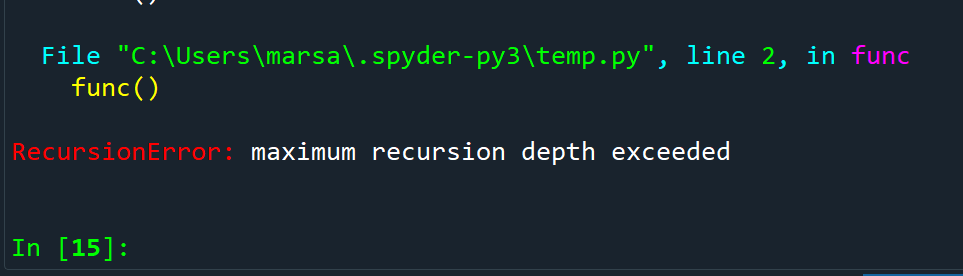
As you can see above, Python will throw an exception called the RecursionError if too many recursive calls are made. This is a significant drawback for large datasets, and an iterative approach must be made using a while or for loop.